Clip-on battery fans have become essential tools for staying cool during the hot summer months, providing portable relief wherever you go. Whether you’re at the beach, camping, or working in a hot office, these fans offer convenient cooling solutions. However, like any electronic device, they require regular maintenance to ensure longevity and optimal performance. In this guide, we will explore how to properly maintain your clip-on battery fan, ensuring that you get the most out of your investment.
Understanding Your Clip-On Battery Fan
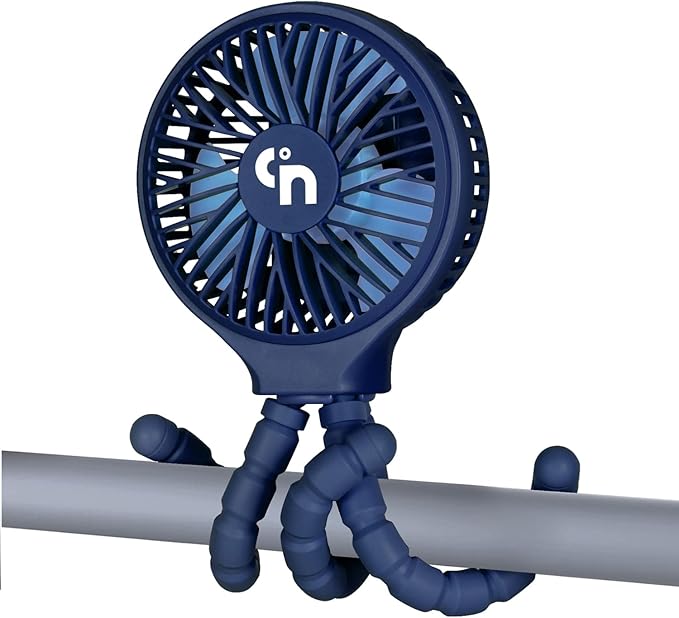
Before diving into maintenance tips, it’s important to understand the components of a clip-on battery fan:
- Fan Blades: These are responsible for moving air and can accumulate dust and debris.
- Battery: The power source for the fan, which may be rechargeable or replaceable.
- Motor: The component that drives the fan blades and can wear out over time.
- Clip Base: The part that attaches the fan to surfaces; it must be secure to prevent accidents.
Daily Maintenance Tips
To keep your clip-on battery fan in top condition, follow these daily maintenance tips:
- Clean the Blades: Dust and dirt can accumulate on the fan blades, reducing airflow. Use a damp cloth to gently wipe them down daily.
- Check the Battery: Ensure that the battery is charged or in good condition. If your fan uses replaceable batteries, check them regularly.
- Inspect the Clip: Regularly check that the clip is functioning properly and can securely attach to surfaces without slipping.
Weekly Maintenance Routines
In addition to daily care, implementing a weekly maintenance routine can significantly extend the life of your fan:
- Deep Clean: Remove dust buildup from the fan’s exterior using a soft brush or vacuum attachment. Ensure it’s unplugged when cleaning.
- Inspect the Motor: Listen for unusual sounds that might indicate a motor issue. If you hear grinding or squeaking, it may need lubrication.
- Battery Check: For rechargeable batteries, ensure they are holding a charge effectively. Replace them if they show signs of swelling or leakage.
Monthly Maintenance Checks

Performing more thorough checks on a monthly basis can prevent larger issues from arising:
- Disassemble for Cleaning: If you’re comfortable doing so, disassemble the fan to clean internal components that are otherwise inaccessible.
- Check Wiring: Inspect the wiring for any signs of wear or damage. Exposed wires can pose a safety hazard.
- Test All Functions: Ensure all settings (speed and oscillation) are working properly. If not, it may indicate a malfunction.
Common Issues and Troubleshooting

Even with regular maintenance, your clip-on battery fan may encounter some common issues. Here are some potential problems and how to address them:
1. Fan Won’t Turn On

If your fan doesn’t power on, consider the following:
- Check if the battery is charged or properly inserted.
- Inspect the power switch; it may be stuck or malfunctioning.
- Examine the wiring for any signs of damage.
2. Reduced Airflow
If the airflow is weak, it could be due to:
- Dirty fan blades that need cleaning.
- A worn-out motor that may need replacement.
3. Unusual Noises

If you hear grinding or squeaking noises, it may be due to:
- Lack of lubrication in the motor; consider adding a few drops of light machine oil.
- Loose components that need tightening.
Storage Tips for Longevity

Proper storage can significantly affect the longevity of your clip-on battery fan. Here are some tips:
- Store in a Cool, Dry Place: Avoid exposing the fan to extreme temperatures or humidity, which can damage the components.
- Remove Batteries: If you won’t be using the fan for an extended period, remove the batteries to prevent corrosion.
- Cover the Fan: Use a dust cover or a bag to protect the fan from dust when not in use.
When to Seek Professional Help
While many maintenance tasks can be performed by the owner, there are times when seeking professional assistance is advisable:
- If the motor is malfunctioning, consider consulting a technician.
- For electrical issues, do not attempt to fix wiring yourself; a professional can ensure safety.
- If you notice unusual behavior (e.g., overheating), it is best to have the fan inspected.
Case Studies: Real-Life Examples
Understanding the importance of maintenance can be solidified through real-life examples. Consider the following case studies:
Case Study 1: The Office Worker
A worker named Sarah relied on her clip-on battery fan for relief in her sweltering office. She cleaned her fan regularly but neglected to check the battery. Eventually, the fan stopped working entirely. After a costly replacement, Sarah started a weekly check routine that included battery inspections, drastically improving her fan’s lifespan.
Case Study 2: The Camping Enthusiast
John, an avid camper, often took his clip-on battery fan on trips. After a few months of use, the fan began to show signs of wear. He disassembled it for a deep clean and lubricated the motor, which restored its efficiency. John now swears by his monthly maintenance routine, ensuring his fan is always up for the adventure.
Statistics on Fan Usage and Maintenance
According to a recent survey, approximately 60% of people who use battery-operated fans do not perform regular maintenance. Of those, 30% reported that their fans stopped working within a year. On the other hand, users who routinely maintained their fans reported an average lifespan of over three years. These statistics highlight the critical role maintenance plays in the longevity of clip-on battery fans.
Maintaining your clip-on battery fan is crucial for ensuring it operates efficiently and lasts as long as possible. By following daily, weekly, and monthly maintenance routines, addressing common issues promptly, and storing the fan properly, you can enjoy cool breezes without interruption. Remember, investing a little time in maintenance today can save you from costly replacements tomorrow. Whether you’re using your fan at home or on the go, a well-maintained fan will always be ready to provide the comfort you need.